Getting Started
Terrazzo takes DTCG design token JSON and generates code for any platform (e.g. CSS, Sass, JS/TS, and more). You can either run the Terrazzo CLI manually, or as part of your CI process.
tip
Migrating from 0.x? Check out the Migration Guide.
Setup
First, install the package using your package manager of choice:
npm i -D @terrazzo/clipnpm i -D @terrazzo/clibun i -D @terrazzo/cliAnd you can create a configuration and install plugins with the init command:
npx tz init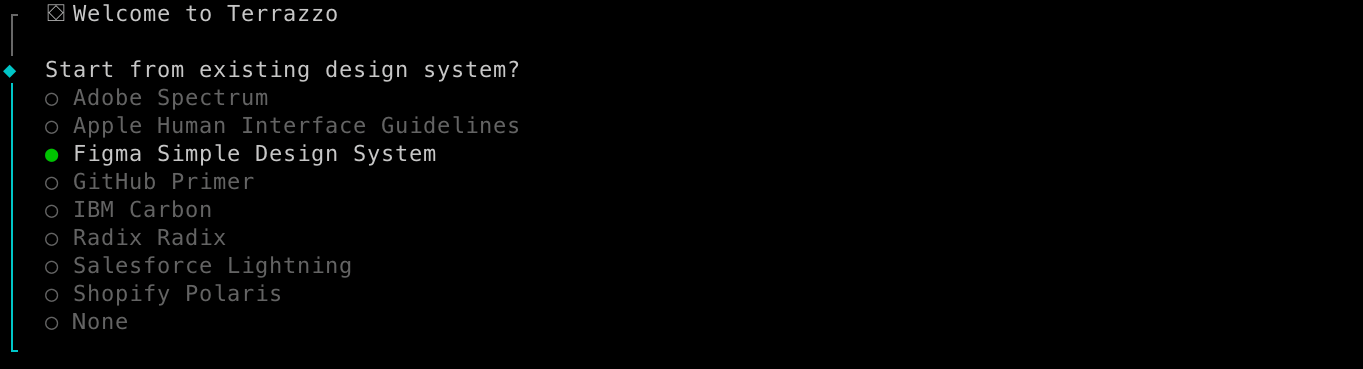
This will create a terrazzo.config.ts starter config file, and even start your token system from a popular open source design system.
Comparison
- vs Style Dictionary: Terrazzo is the only tool that supports the full DTCG format (support for resolvers and other 2025.10 features coming in 2.0!). But this will change as Style Dictionary is now following Terrazzo’s path in adopting DTCG.
API
| Command | Description |
|---|---|
init | Scaffold out a new project from an existing design system. |
build | Build tokens with your plugins and also run linting. |
lint | Only run token linting (not build). |
check [file] | Validate a given tokens JSON meets the DTCG specification. |
bundle [file] --output [file] | Bundle a resolver that references multiple files into a single JSON file. |
--help | Display help message. |
--silent | --quiet | Suppress warnings and logs. |
Debugging
With any command, set the DEBUG env var to a glob scope (accepts wildcard-match globs):
DEBUG=* tz build: debug all scopesDEBUG=parser:* tz build: debug @terrazzo/parser (core)DEBUG=plugin:* tz build: debug plugins